Introducing Transport Vector Dark Mode
Earlier this year, we shipped Transport on our Vector Styles API. Now, we’re pleased to launch Transport Vector Dark Mode, which is ideal for interactive transit apps, logistics dashboards, or urban planning tools where a light map would look out of place.
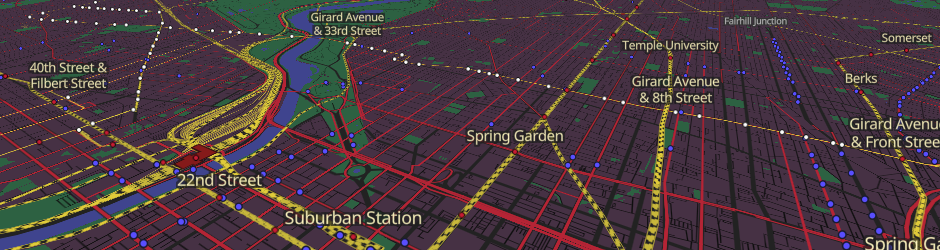
Our approach to Transport Vector Dark Mode
Our main challenge with Transport Vector Dark Mode was to make it look exactly the same as our existing map tiles version.
We put a huge amount of work into creating Transport Dark Mode on our Map Tiles API. We took every element of our standard Transport style and asked how we could optimise them for a dark environment.
Although inverting and rotating colours, as some companies do, is a neat mathematical solution, it doesn’t actually work. The human eye is good at differentiating similar bright colours, but much less so with dark colours. Simply using ‘shades of dark’ can be unreadable. So we don’t.
- Railways are one of the most prominent features on our Transport styles. They aren’t actually fully black on our standard colour scheme, so inverting them would lead to an unpleasant-looking off-white grey. Fully white features are also generally best avoided in dark colour schemes, so we chose a strong yellow - eye-catching but not too bright - that fits well with our background colour too.
- Building shadows are one of those features that you shouldn’t notice if they are done well; but they pull attention away from important transport features if they are done badly. Simply inverting and rotating for dark mode would create white shadows, and that looks odd to the human eye. We had to carefully balance the shadows with both the building and background colours to get the desired effect.
When to use Transport Dark on our Vector API
There are two natural integration points for this style:
Dark-by-default products
If your dashboard, app, or developer tool is built dark, a light map looks out of place. Transport Vector Dark Mode integrates nicely without the jarring contrast of a bright tile layer inside a dark UI.
Reflecting system preferences
Use Transport Vector Dark Mode alongside our standard Transport Vector style, and switch between them based on prefers-color-scheme. Users get a consistent experience that matches their OS setting automatically.
Getting started
Transport Vector Dark Mode is available to all our customers via the Vector Styles API. The URL format is as follows:
https://api.thunderforest.com/styles/transport-dark/style.json?apikey={apikey}
For more information, go to our Vector Styles API documentation.
New customers can sign up for free to test Transport Dark.

Andy Allan is the Founder and Chief Mapwrangler